¶ Supplier Order Portal
The Supplier Order Portal gives suppliers a direct way to view and act on Purchase Orders without creating an account or logging in. Buyers send POs from Axya, and the supplier receives everything they need through a single secure link.
¶ Accessing the Portal
When a buyer sends a PO, the supplier receives an email containing:
- The buyer's name
- The company name
- The purchase order number
- A link to the Axya platform
- A link to the PO PDF
- A PDF copy attached to the email
Clicking the link opens the order directly -- no registration, no password. The portal has a distinct black header bar so it is easy to distinguish from the buyer interface.
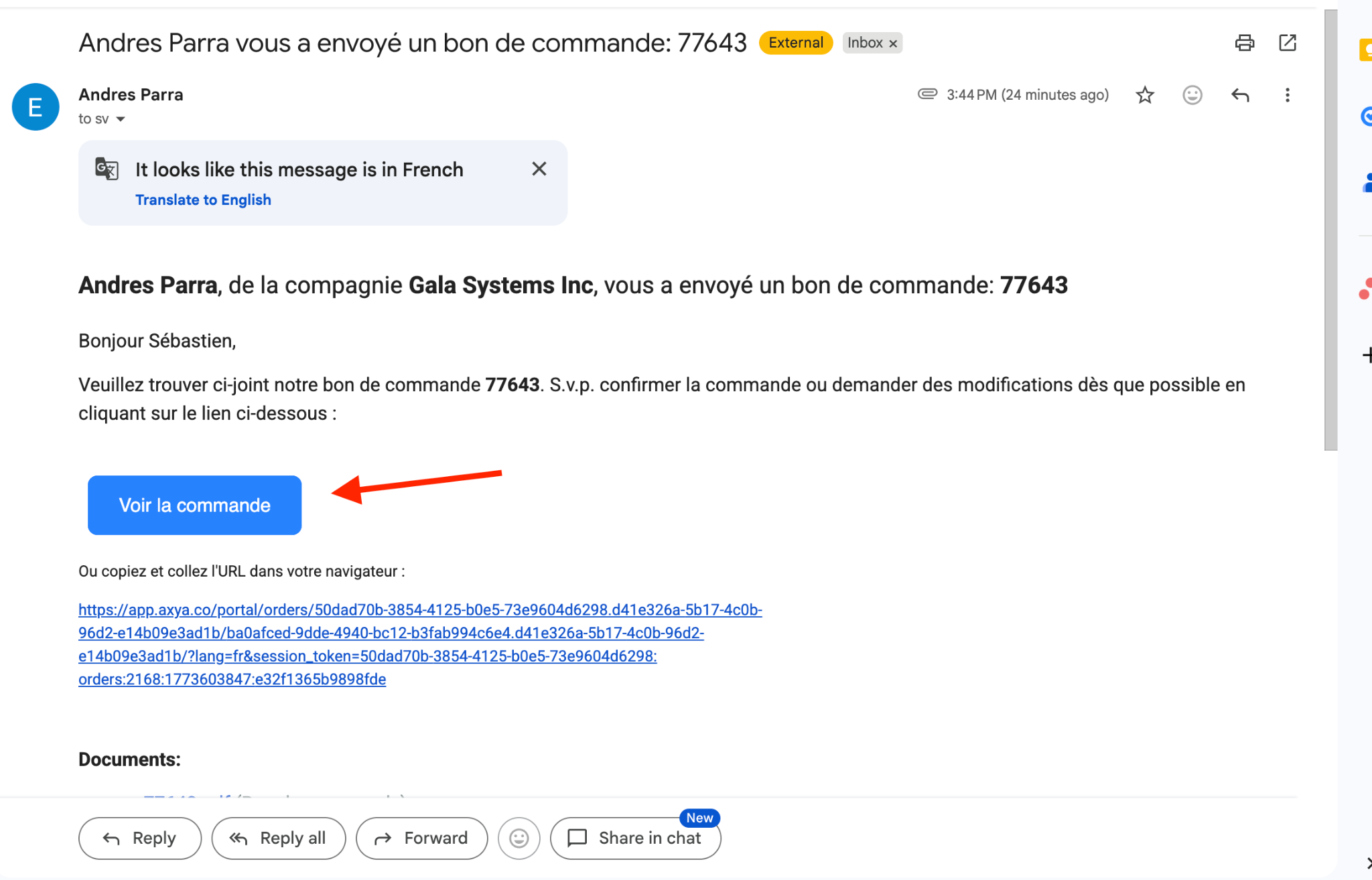
Each link is tied to a specific supplier contact. If your organization has multiple contacts receiving POs, each person receives their own link.
¶ What Suppliers Can See
The portal displays the same core order information the buyer sees:
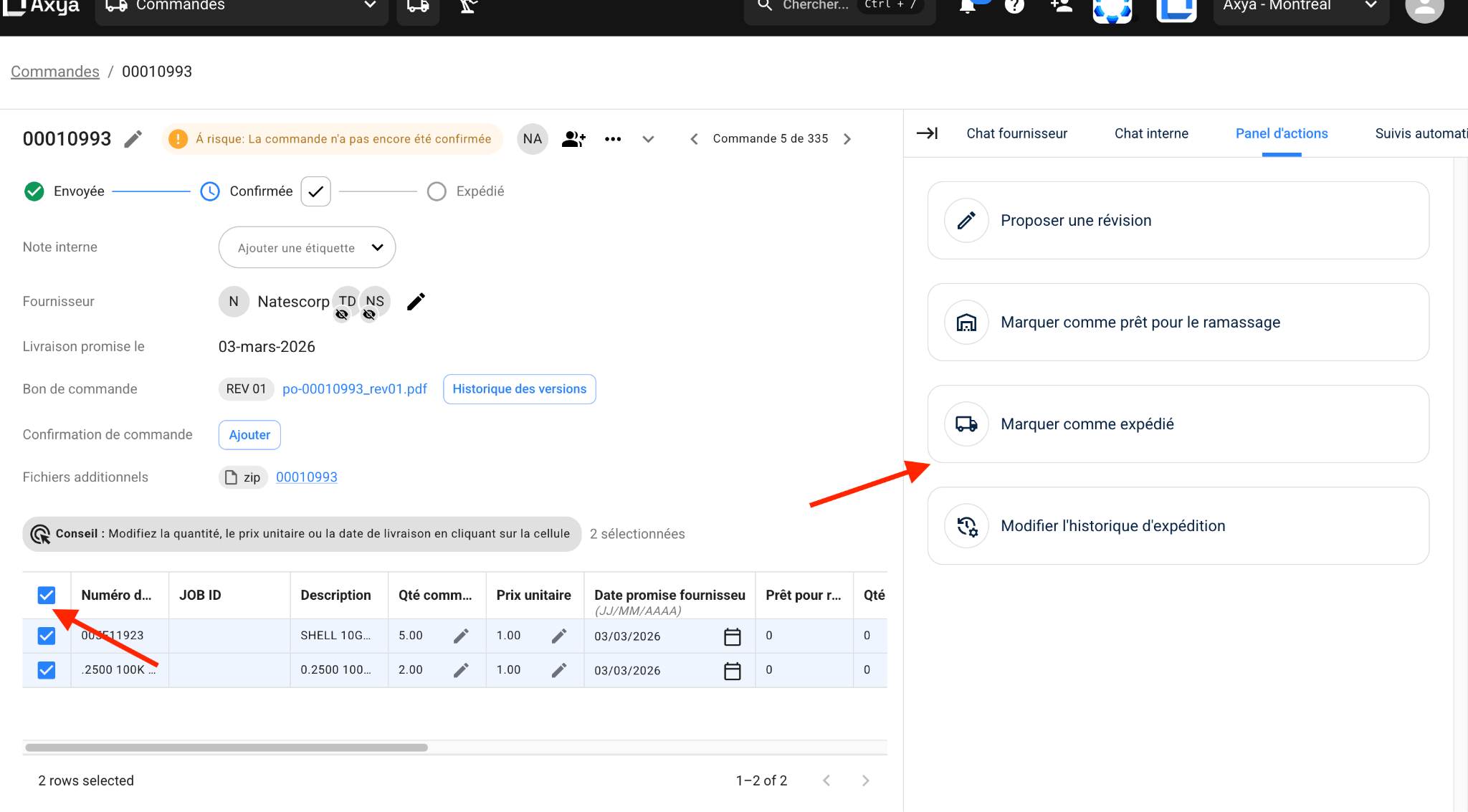
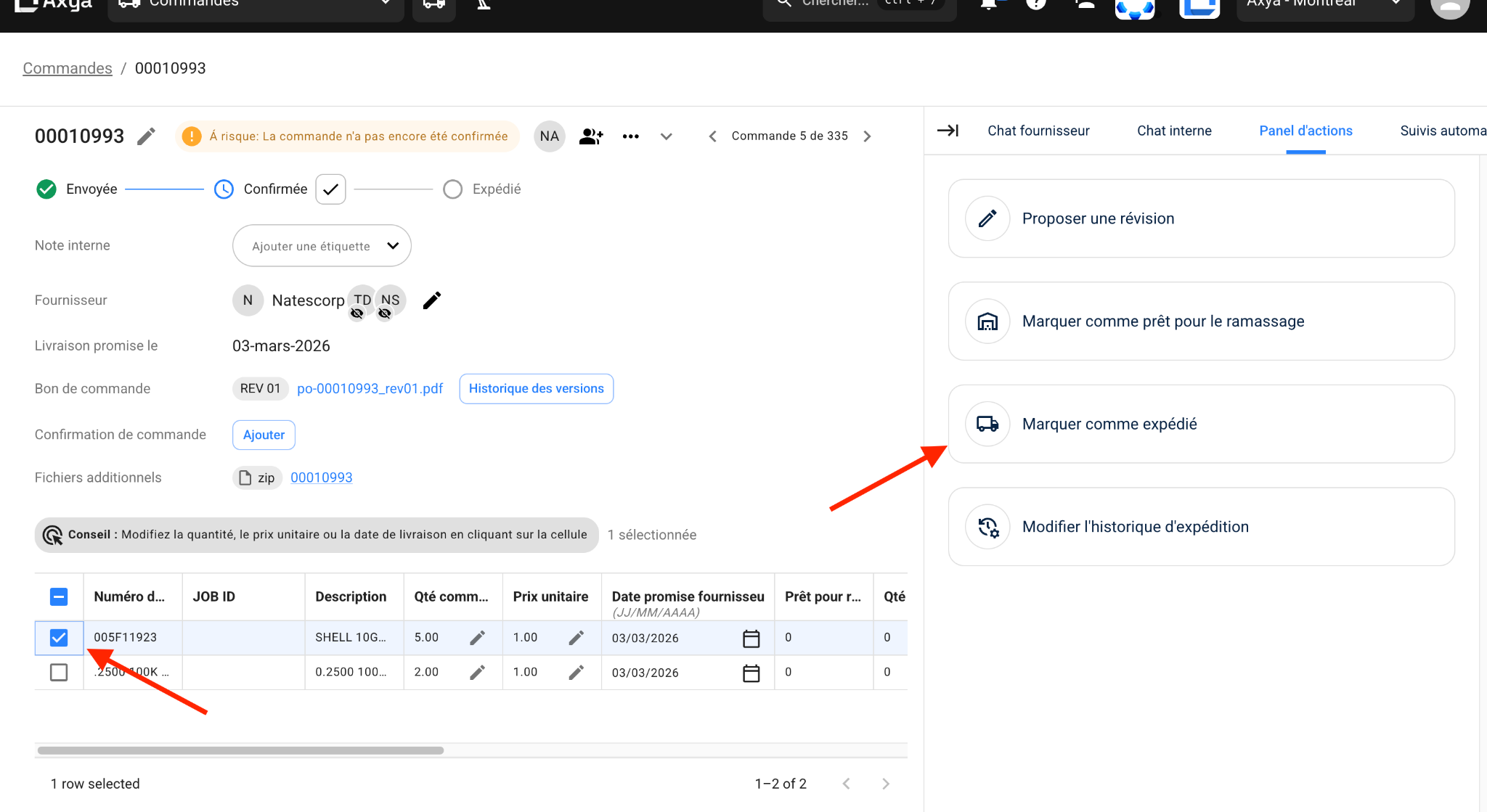
- Order name and current status with a visual progress stepper: Sent → Acknowledged → Ready for Pickup → Shipped.
- Line items table showing part name, quantity, unit price, delivery date, and status for every item.
- PO files and attachments — downloadable directly from the portal.
- Q&A channel — a dedicated communication thread with the buyer for questions, clarifications, and updates.
¶ What Suppliers Cannot See
The portal is scoped to external-facing information only. Suppliers do not have access to:
- Internal notes or internal chat between buyer team members.
- The buyer's internal discussions or decision history.
- Information about other suppliers on different orders.
- Administrative controls such as cancel or delete.
¶ Supplier Actions
¶ Acknowledge the Order
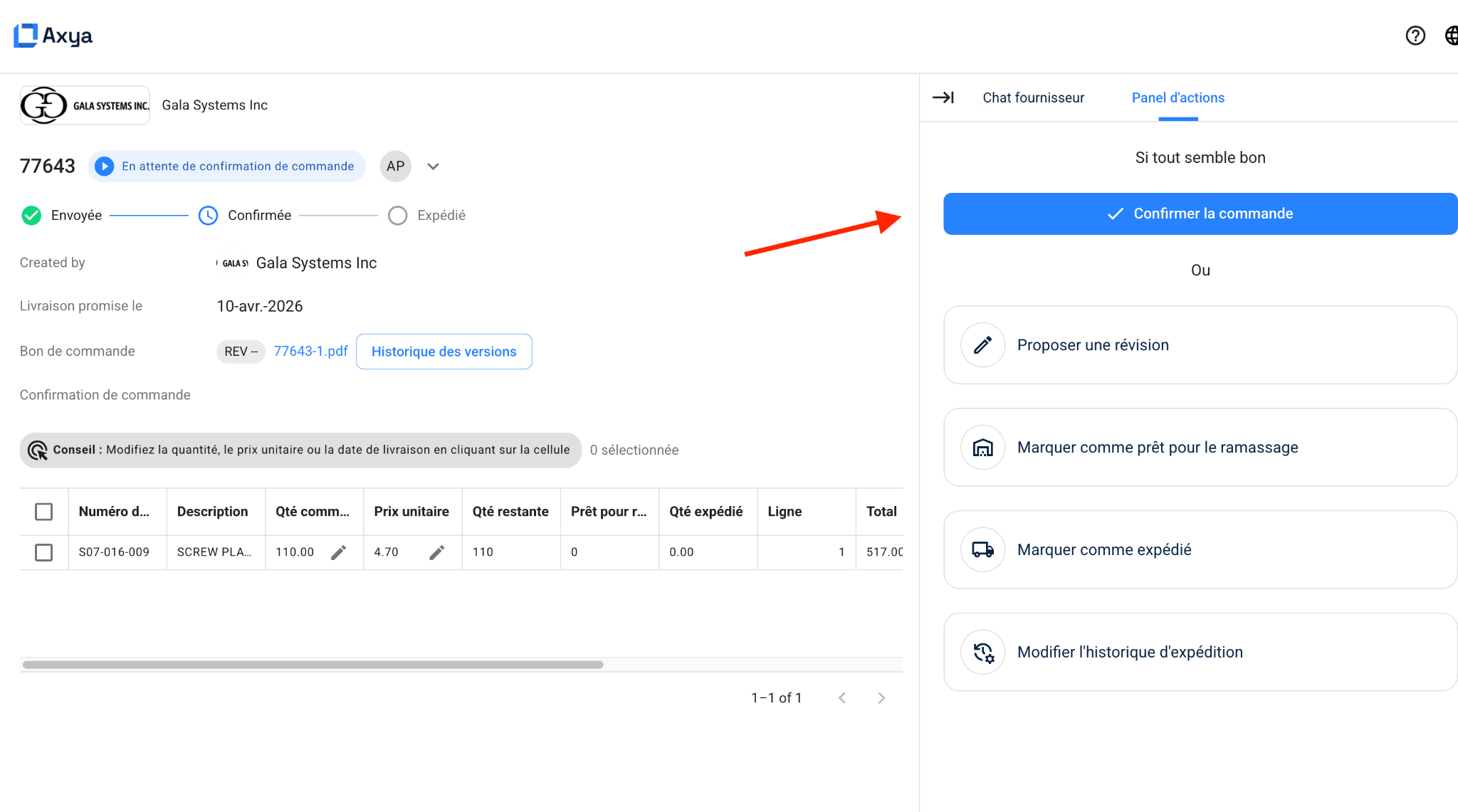
Confirm receipt and acceptance of the PO. If all information is correct (quantity, price, delivery date):
- Click Confirm the order.
- Add a message if necessary.
- Attach your official order confirmation PDF (optional).
- Click Confirm.
Suppliers can acknowledge the full order or, when enabled, acknowledge individual line items. See PO Acknowledgment for the complete workflow.
¶ Confirming by Email
You can also confirm the order by replying directly to the email received. Axya automatically redirects the message to the correct order in the platform.
Alternatively, send an email directly to engineering@axya.co. This method is particularly useful for ERP integrations.
Important: The PO number must appear in the email subject so that Axya can associate the confirmation with the correct order.
¶ Propose a Revision
If certain information needs to be modified, you can propose an order revision directly in the platform:
- Modify quantity -- Click the pencil icon next to the quantity and enter the proposed quantity (e.g., if a product is sold in packs of 20, you can propose 20 instead of 5). The action will appear in the actions panel on the right.
- Modify price -- Click the pencil icon next to the price and enter the proposed amount.
- Modify delivery date -- You can change the delivery date for the entire order or for individual items.
Before sending, review all proposed changes. The proposal is sent to the buyer, who can accept or refuse the revision. See PO Revisions for details.
¶ Mark as Ready for Pickup
Indicate that items are prepared and available for collection. Suppliers enter the ready date and can add notes for the buyer.
¶ Confirm Shipment
Once items have been shipped, you can indicate the shipment directly in the platform:
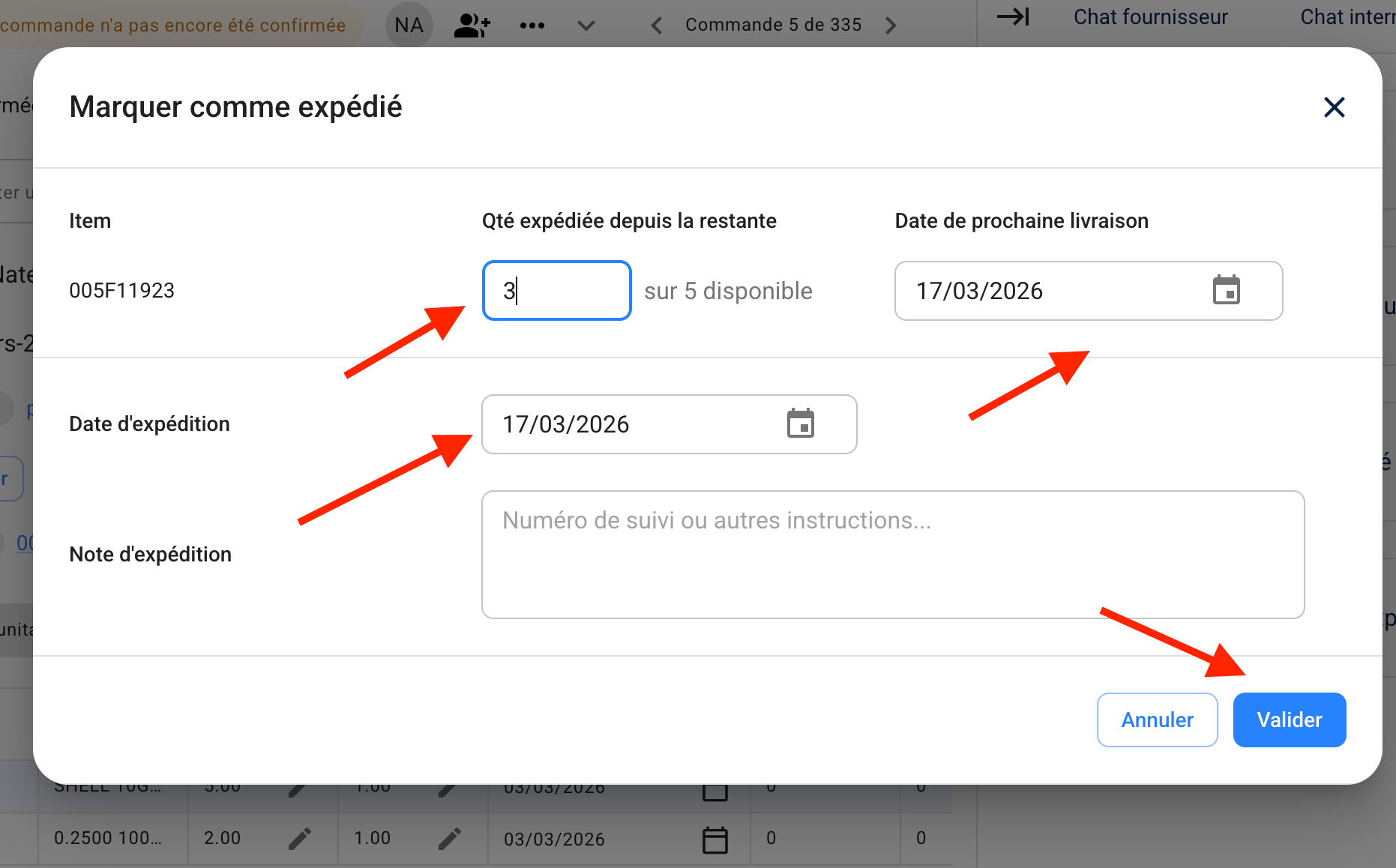
- Partial shipment -- If only some items have been shipped, specify the quantity shipped for each item, the shipment date, and any relevant notes.
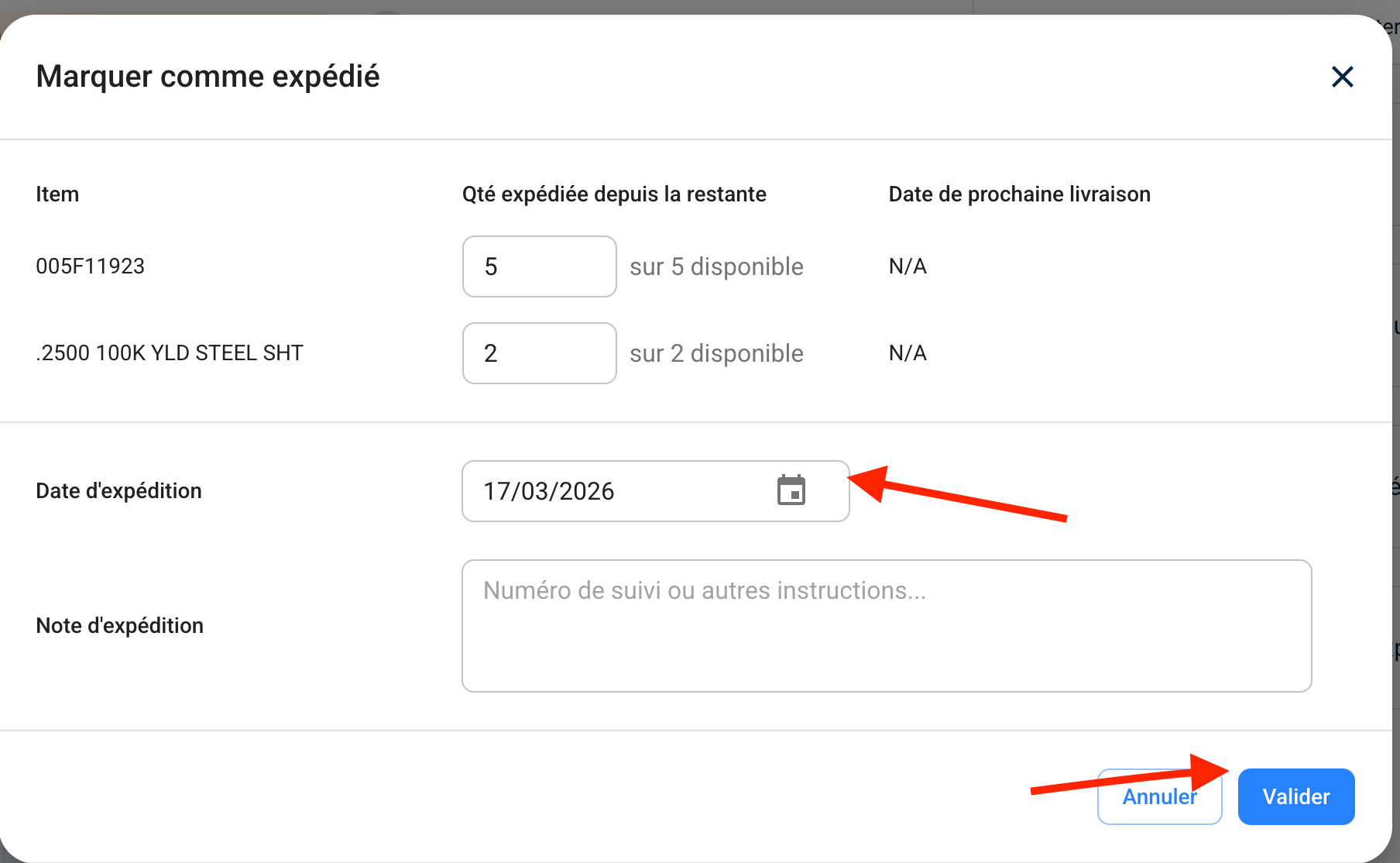
- Full shipment -- If the entire order has been shipped, confirm the full shipment with the shipment date.
Once the shipment is confirmed, the order is updated in Axya. See Shipment Tracking for more on how shipments are managed.
¶ Handling Late Orders
If an order is running late, you can update the expected delivery date and notify the buyer directly from the portal.
¶ Edit Shipping History
If a past shipment record needs correction -- for example, an incorrect quantity or date -- suppliers can edit previously submitted shipment entries directly from the portal.
¶ Communicate with the Buyer
Use the Q&A channel to send messages, ask questions, or share updates. Both parties see the full conversation history.
¶ Supplier Order Dashboard
When a supplier navigates away from an individual order, the portal presents a dashboard showing their full order portfolio with that buyer. The dashboard uses the same loginless experience — no account required.
¶ Performance Metrics
At the top of the dashboard, suppliers see key metrics covering the last 90 days:
- Orders Sent — Total number of POs received from the buyer.
- Acknowledgment Time — Average time to acknowledge orders.
- Acknowledgment Rate — Percentage of orders acknowledged.
- Shipping Rate — Percentage of orders with confirmed shipments.
¶ Filtering and Navigation
- Point of Contact — Switch between different contacts at your organization to view their respective orders.
- Status filters — Simplified labels designed for supplier workflows: Pending Confirmation, On Track, Updated, and Pending Shipping.
- Shipping urgency — A quick filter highlights items that need to ship within the next 5 days.
- Table controls — Sort, filter, and customize visible columns, matching the functionality available in the full application.
¶ Relationship to the PO Lifecycle
Each status label on the dashboard maps to a stage in the PO Lifecycle. For a complete breakdown of how orders progress from creation to completion, refer to that guide.
Tip: Bookmark your portal link for quick access. The link remains valid and always shows the latest order data.
¶ Video Walkthrough
¶ Confirming an Order and Reporting Shipments in Axya
| Previous | |
|---|---|
| Communication |