¶ PO Status Lifecycle
Every purchase order in Axya moves through a series of states that reflect its real-world progress. Understanding these states helps you know exactly where an order stands and what action is needed next.
¶ The Nine PO States
| State | Description | What It Means |
|---|---|---|
| Draft | Order created but not yet sent | The buyer is still editing line items and details. |
| Waiting for Acknowledgment | Order sent to the supplier | The supplier has received the PO and needs to confirm it. See Acknowledgment. |
| On Track | Supplier acknowledged, progressing normally | Delivery dates are expected to be met. |
| Updated | Supplier proposed changes | The buyer needs to review and approve or reject the proposed revisions. See Revisions. |
| At Risk | Delivery dates at risk | The order may have issues meeting its deadlines. |
| Late | Delivery dates missed | The order is overdue. |
| Ready for Pickup | Items ready at the supplier location | The buyer can arrange collection of the goods. |
| Shipped | Items have been shipped | The order is in transit. See Shipment Tracking. |
| Completed | Order fully received or archived | The order moves to the Archived tab. |
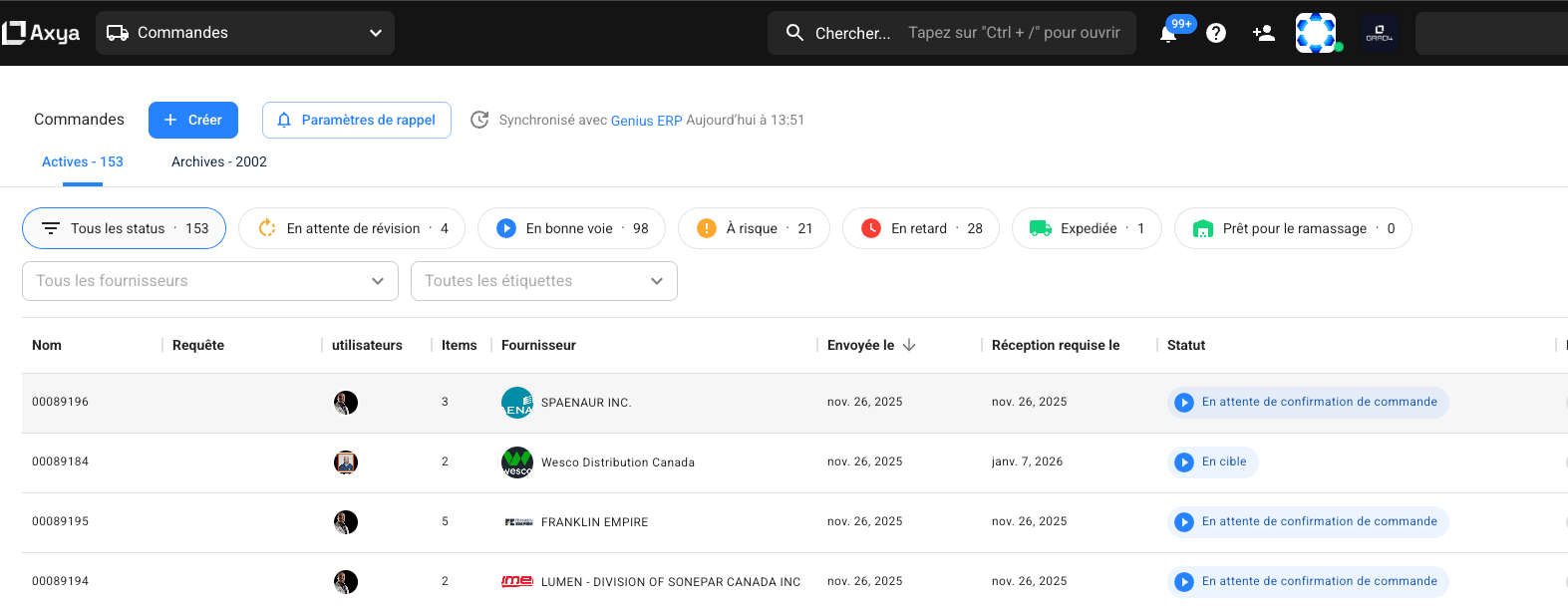
¶ Visual Indicators
Axya uses several visual cues so you can assess order status at a glance:
- State Tags — Color-coded chips with icons that appear on both the orders listing and the Order Detail Page. Each state has a distinct color (for example, green for On Track, red for Late).
- Progress Stepper — A horizontal progress bar on the detail page showing four milestones: Sent → Acknowledged → Ready for Pickup → Shipped. Steps are highlighted as the order advances.
- Shipment Progress — A circular progress indicator on the orders listing that combines shipped and ready-for-pickup quantities into a single visual, so you can quickly see how close an order is to completion.
¶ State Transitions
Orders follow these paths as they progress:
- Draft → Waiting for Acknowledgment — The buyer sends the order to the supplier.
- Waiting for Acknowledgment → On Track — The supplier acknowledges the order.
- On Track → Updated — The supplier proposes a revision (date, quantity, or price change).
- Updated → On Track — The buyer approves or rejects the proposed changes.
- On Track → At Risk / Late — Triggered automatically based on delivery date proximity.
- On Track → Ready for Pickup — The supplier marks items as ready for collection.
- On Track → Shipped — The supplier confirms shipment.
- Ready for Pickup → Shipped — Items are collected or shipped after being staged.
- Any active state → Completed — All items have been received or the order is archived.
¶ Reverting Status
Buyers can move an order back to a previous state when corrections are needed:
- Shipped → Ready for Pickup or Acknowledged — Revert a shipment confirmation.
- Ready for Pickup → Acknowledged — Revert a ready-for-pickup status.
There are two important rules for reverting:
- Revert is blocked if any line item has been fully received. Once goods are received, the status cannot go backward for those items.
- Shipping data is cleared when you revert. Any shipment dates and quantities associated with the reverted status are removed, so you will need to re-enter them when the order progresses again.
For details on how to perform these actions, see the Actions tab on the Order Detail Page.
| Previous | Next |
|---|---|
| Order Detail Page | Acknowledgment |